Recruiting players for your club
A club needs new people every season: someone leaves, someone’s hours change, you’re short of a goalkeeper. Recruiting well means saying clearly what you’re after, being where players look and answering quickly. This guide shows how.
Open recruiting
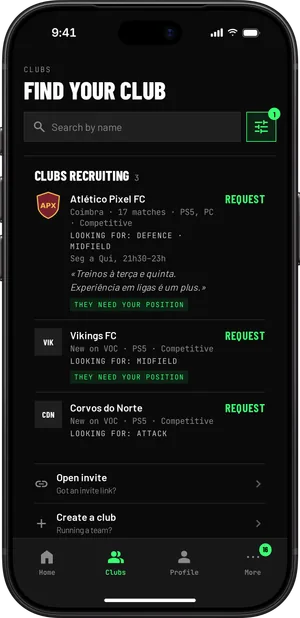
In Club settings, under Recruiting, switch on We’re recruiting and set out:
- What you’re looking for, in one sentence
- The positions: goalkeeper, defence, midfield, wing or attack
- The platform: PS5, Xbox or PC
- The atmosphere: competitive or relaxed
- When you play
Be specific. "Looking for a centre-back for Tuesday and Thursday evenings" attracts the right people. "Looking for players" attracts everyone and no one in particular.
Where players find you
- On the club’s public page, with the Ask to join button.
- In the clubs forum of the VOC Discord, with what you’re looking for and your platform.
- In the app, players without a club see the clubs recruiting for their position and platform.
The club only appears in the clubs forum of the VOC Discord once it has its first match or player on record, and you can turn that off in the settings.
Find players and invite them with a message
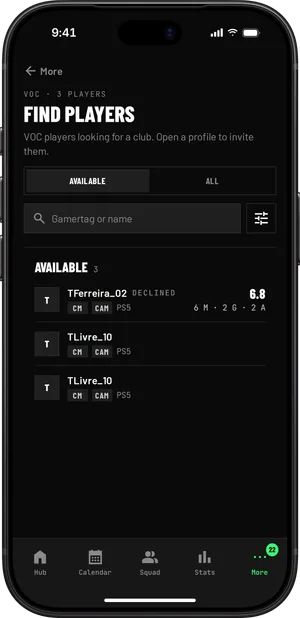
In Find players, under More, you see the VOC players who are in the players forum and aren’t in your club: their positions, platform, numbers on VOC and whether they’re available. You can filter by availability, position and platform.
Invite to the club sends an invite to that player only, with a message from you if you like. It reaches them by notification and email and is valid for seven days. They accept or decline.
- One open invite at a time for the same player
- Up to ten invites a day per club
- If the player declines, you wait thirty days before inviting them again
Join requests: accept with the right role
Anyone asking to join can write a message. The request reaches whoever manages the members, by notification and by email, and waits in Members.
When you accept, you choose the role. As a player, VOC creates their squad entry straight away, linked to their account. Answer quickly, even if it’s to say no: a player left without an answer looks for another club.
For people you already know, there’s the club link and invites by email or WhatsApp, also in Members.
Before you hand over the shirt
Invite them to a training session before you promise a place. You see how they play, how they communicate and whether the schedules really line up, and the player sees whether the club is what they expected.
Say from the start what you expect: how many evenings a week, which position and what happens if they miss a match without warning. It’s easier to be clear on day one than halfway through the season.
Close recruiting
When the squad is complete, switch off We’re recruiting. The club no longer shows as recruiting and the Ask to join button disappears from the public page.